TP-Link Tapo
- 4.6
- Rating
- 10.00M
- Installs
- Free
- Price

 Analysis by App-foxy
I came away from TP-Link Tapo with a clear impression: it is a practical control center for people who already use compatible Tapo smart devices and want less friction in everyday routines. I would not choose it as a general smart-home app without owning that ecosystem, but within it, the app makes remote control feel straightforward rather than technical. That focus is its biggest strength and also its main limitation.
Developed by TP-LINK SYSTEMS INC., this free Lifestyle app lets me manage Tapo equipment from a phone instead of moving between individual device controls. Its audience is broad enough to include someone switching on a light before arriving home, a parent checking a connected device from another room, or a household trying to make several smart products easier to handle. The Everyone age rating also makes its presentation approachable, although the usefulness still depends on the devices installed at home.
What using Tapo feels like in everyday life
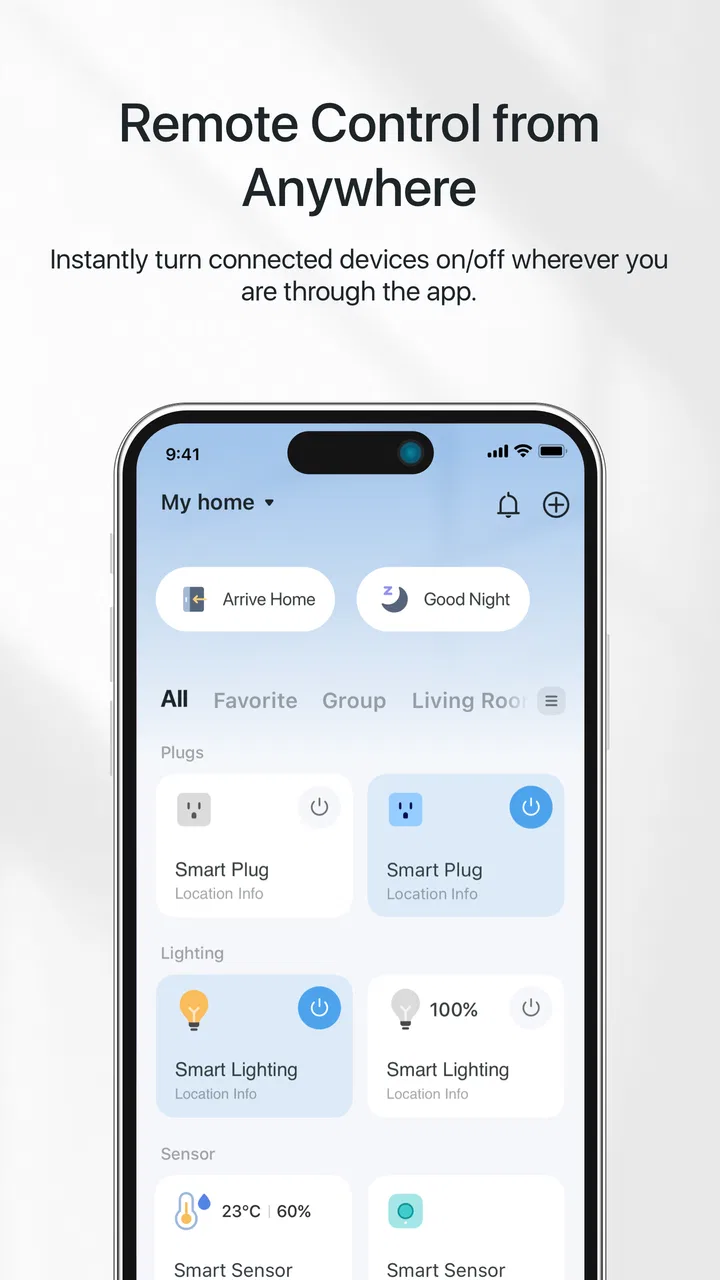
The first thing I noticed is that Tapo is built around action rather than explanation. Once the relevant devices are connected, the app’s value comes from giving me a single place to check their status and operate them. That sounds simple, but it matters when a home contains more than one smart product. I would rather open one familiar interface than remember which separate control belongs to which device.
You May Also Like

 Blood Strike: 2.5 Anniversary
Blood Strike’s Loadouts Turn Every Drop Into a Tactical Gamble
A close look at Blood Strike’s custom loadouts: how fast access to signature weapons reshapes its battle royale rhythm, rewards preparation, and narrows the gap between fights.

 Pandora - Music & Podcasts
Pandora’s Music Is Easy to Start, but Harder to Recover
Pandora’s strength is its low-effort path from a seed to a station. Its weak spot is how much confidence it asks you to place in connection, setup, and quiet recovery.

 8 Ball Pool
 Is Built on Rivalries, Rematches, and Routine
A close look at the rivalries, rematches, shared routines, and unanswered safety questions that turn a quick pool match into a persistent mobile community.

 Samsung Music
’s Quiet Strength Is Playing What You Already Own
Its reach comes less from spectacle than from dependable access to a personal library. That simplicity is both the app’s strongest retention engine and its ceiling.

 AccuWeather: Weather Radar
AccuWeather Review: A Quick, Clear Forecast for Everyday Decisions
For everyday plans, the best forecast is the one you can understand quickly. AccuWeather makes rain timing, radar, and local conditions easy to act on, with a few trade-offs.

 Hill Climb Racing
Why Hill Climb Racing Still Turns Crashes Into One More Run
A tiny car, a bumpy hill and one more upgrade: Hill Climb Racing keeps resurfacing because its simple chaos makes every near-miss feel personal.
More From Our News Desk
View All News


A realistic example is arriving home on a dark evening. Instead of waiting until I am inside to adjust a connected light or another compatible device, I can use the app remotely and prepare the room in advance. The same workflow can be useful when I am away and want to check a device, or when I need to change something without walking to another floor. These small interactions are where the app earns its place; it turns occasional chores into quick phone actions.
The experience is particularly appealing to people who prefer a focused ecosystem. Tapo does not try to be a universal dashboard for every smart-home brand. That narrower approach can make the experience easier to understand than a broad platform filled with products from many manufacturers, especially for someone who wants to avoid comparing compatibility layers before completing a basic task.
Its popularity reflects that approachable role. The app has passed 10 million installs and holds a 4.6 average from roughly 459 thousand ratings. Those figures do not guarantee that it will suit every household, but they do suggest that the central idea—controlling Tapo devices from one mobile app—works for a substantial audience.
The strongest part is the everyday control loop
In my experience, the most convincing benefit is the short path between noticing a need and acting on it. I do not have to treat the app like a technical project every time I want to make a change. That is important for family homes, where not everyone wants to learn a complicated automation system. A shared device-management habit is easier to maintain when the main controls are recognizable and close at hand.
Remote access is also more useful than it first appears. It is not only about convenience while sitting on the sofa. It can help when plans change, when I forget to adjust something before leaving, or when another person at home needs a device changed without knowing where it is physically located. This is the kind of benefit that becomes noticeable after repeated use rather than during a quick first launch.
Another strong point is the ecosystem-specific focus. A general smart-home platform may offer wider compatibility, but that breadth can introduce extra setup decisions and inconsistent controls. Tapo gives me a more direct relationship with TP-Link’s own range. If my household is already committed to those products, keeping management in the manufacturer’s app can be less confusing than forcing everything through a third-party alternative.
That choice comes with a trade-off. Tapo is most persuasive when the home is already centered on compatible Tapo hardware. If I were starting from nothing and wanted freedom to mix brands, I would compare broader platforms before committing. The app itself may be free, but the practical value comes from the equipment it controls, so the decision should begin with the household’s device plans rather than the download alone.
Small habits that make the app more useful
I found that the best way to approach Tapo is to organize around routines instead of individual gadgets. For example, I would think in terms of “leaving home,” “coming back,” or “night-time checks,” then decide which devices actually need attention in each situation. This prevents the app from becoming a long list of controls and makes remote access feel purposeful.
A useful habit is checking the app before leaving rather than relying on memory. Smart-home convenience often fails because people remember the impressive possibilities but forget the simple daily workflow. Opening Tapo as part of a departure routine can help me confirm that the relevant device is in the state I expect. It is a modest change, but it makes the app part of a repeatable habit instead of an emergency tool.
I would also avoid giving every household member an overly complicated explanation. The app is easier to adopt when people learn the few controls they genuinely need first. Someone who only wants to adjust a device remotely does not need a full tour of every available option. This is one reason the focused design works well for less technical users: the app can be introduced as a practical remote control rather than as a hobby project.
For troubleshooting, I would start with the basics before blaming the app. A remote control tool depends on the phone, the home network, the device, and the account connection all working together. If an action does not respond, checking whether the device is reachable and whether the phone has a stable connection is more sensible than repeatedly tapping the same control. This layered dependency is common in smart-home apps, but Tapo users should understand it before expecting every action to be instantaneous.
Where the experience becomes less comfortable
The biggest weakness is that Tapo cannot remove the complexity of the hardware ecosystem around it. The app may provide a central place to control devices, but setup, connectivity, and compatibility still shape the experience. Someone who expects a phone app to solve every smart-home problem may be disappointed when an issue actually comes from a device connection or a home network condition.
I also see a limitation in the ecosystem boundary. Tapo is a sensible choice for a Tapo-centered home, but it is not automatically the best answer for someone who owns products from several unrelated brands. A broader smart-home platform may be preferable when the priority is one mixed-brand dashboard, even if that alternative feels less streamlined for any single manufacturer’s products.
The app’s in-app purchase range, from $2.49 to $199.99 per item, is another detail I would keep in mind. The app is free to download, but users should distinguish between accessing the app and any optional purchases connected with its wider offering. I would not assume that every useful capability or service follows the same cost model. Before building a routine around a particular option, I would check what it requires and whether it fits the way I plan to use the ecosystem.
There is also a psychological limitation to remote control: convenience can encourage over-management. I can imagine checking devices too often or creating routines that are more complicated than the original task. Tapo works best when it reduces decisions, not when it turns every household action into another notification or manual check. My advice is to begin with the controls that solve a real annoyance and expand only when the benefit is obvious.
Who should choose it, and who should look elsewhere?
I would recommend Tapo first to people who already own compatible TP-Link smart devices, want a manufacturer-focused experience, and value quick control from a phone. It is also a good fit for households where some users are comfortable with technology and others simply want clear, repeatable actions. The app’s role is easy to explain: it is the place to manage the home’s Tapo equipment remotely.
It makes particular sense for renters or anyone who wants convenience without designing an elaborate connected-home system. A person who only needs a few practical controls may appreciate the focused ecosystem more than a platform that presents countless integrations. Likewise, someone buying several Tapo products at once will probably benefit from learning one app instead of managing each device in isolation.
I would be more cautious if my home already contains many brands or if cross-platform automation is the main goal. In that situation, a broader alternative may offer a more unified view, even if it sacrifices some of the directness Tapo provides for its own products. I would also skip it as a standalone download if I do not own, or do not plan to use, compatible Tapo hardware; without devices to manage, the app has little practical value.
Device compatibility is therefore the first question to answer before installing. I would identify the exact Tapo products in the home and confirm that they are intended to work with the app, rather than assuming that every TP-Link-branded smart product behaves identically. This simple check can prevent the most frustrating kind of disappointment: downloading an app expecting universal control and discovering that the household’s equipment belongs to a different product family.
What to expect from support and ongoing use
The app has been available since September 3, 2019, and its current version is 3.17.109. It supports Android 7.0 and later, which makes it accessible to many older Android phones as well as newer models. I would still keep the phone’s operating system and the app updated when possible, because smart-home control depends on several connected parts and outdated software can make diagnosis harder.
Its strong review history—about 5.8 thousand written reviews alongside the much larger rating count—gives prospective users useful social proof, but I would read those opinions with context. A review from someone using one simple device may not match the experience of a household managing several products. The most relevant question is not whether everyone loves the app; it is whether the reported strengths and frustrations resemble the way I intend to use it.
Privacy and account comfort are also worth considering in a general sense. A remote-control app is part of the connection between a phone and a home, so I would choose a sensible account password, keep access limited to people I trust, and avoid treating convenience as a reason to ignore basic digital security. These steps do not make Tapo unique, but they are especially relevant when an app can affect devices while I am away.
For a smoother first week, I would add devices gradually, test local control before relying on remote access, and try the app at the times when I expect to need it. Testing from outside the home is more informative than assuming remote control works because setup completed successfully. I would also give every device a clear name based on its location or purpose. That small naming decision becomes increasingly valuable as the number of controls grows.
My final view after weighing convenience against limits
TP-Link Tapo succeeds because it keeps its promise narrow and useful: it gives owners a practical way to control compatible Tapo smart devices from a mobile device, including when they are away from home. I like that the app can support small routines without demanding that every user become a smart-home enthusiast. Its best qualities appear in repeated daily actions, not flashy demonstrations.
At the same time, I would not mistake a clean control app for a complete answer to every connected-home need. Hardware compatibility, network reliability, ecosystem boundaries, and the possibility of optional purchases all affect the final experience. People who want a mixed-brand command center should investigate broader alternatives, while people without Tapo equipment have little reason to install it.
My recommendation is therefore specific: choose it if your home is already built around Tapo products and you want a straightforward manufacturer app; think twice if flexibility across brands matters more than simplicity within one ecosystem. For the right household, the real advantage is dependable everyday convenience, not an oversized collection of features. That makes it a worthwhile free app for existing Tapo users, provided they enter with realistic expectations about what the software can—and cannot—control.
FAQs for TP-Link Tapo
01What is TP-Link Tapo, and what does it do?
TP-Link Tapo is a smart home app that allows users to control and manage TP-Link smart devices, such as lights, cameras, and plugs, from their smartphones. It offers features like remote access, scheduling, and voice control, providing convenience and enhancing the security of your home environment.
02Is TP-Link Tapo compatible with other smart home systems?
Yes, TP-Link Tapo is compatible with popular smart home systems like Amazon Alexa and Google Assistant. This allows users to integrate their Tapo devices with other smart home gadgets and control them through voice commands, enhancing the overall smart home experience.
03How secure is the TP-Link Tapo app?
TP-Link Tapo prioritizes user security by implementing advanced encryption protocols to protect data transmission between devices and the app. Regular updates are provided to ensure security vulnerabilities are patched. Users are encouraged to set strong passwords and enable two-factor authentication for added security.
04What devices can I control with the TP-Link Tapo app?
The TP-Link Tapo app supports a range of TP-Link smart devices, including smart plugs, light bulbs, and security cameras. It allows users to remotely control these devices, set schedules, and receive real-time notifications, making it a versatile tool for managing a smart home setup.
05Are there any costs associated with using TP-Link Tapo?
The TP-Link Tapo app itself is free to download and use. However, purchasing TP-Link smart devices is required to utilize its features. Some advanced functionalities, like cloud storage for camera footage, may incur additional costs, depending on your needs and subscription options.
Pros
- Easy setup with intuitive interface.
- Affordable pricing for smart home features.
- Compatible with Alexa and Google Assistant.
- High-quality video streaming.
- Reliable motion detection alerts.
Cons
- Limited integration with some smart ecosystems.
- Cloud storage requires subscription.
- Occasional connectivity issues.
- Limited camera rotation capabilities.
- No advanced AI features for alerts.

TP-Link Tapo
Gallery